
Accurate parts lists
Every side, bottom, stretcher, back, face-frame rail and stile, door rail and panel, and drawer box part, with exact finished sizes, materials and notes. Export it to CSV.
Free woodworking design software
Draw cabinets, furniture, shop storage, outdoor structures, garden beds and beehives. Cabinet Maker turns each design into a parts list, sheet-by-sheet cut diagrams, a screw and hardware schedule and a part-accurate 3D model. It is free, with unlimited projects and nothing to sign up for.
How it works
Pick a template, set the sizes and choose how it is built. Every part, cut, screw and hinge is worked out for you, and it all updates the moment you change a number.
Start from more than 320 templates, from your own plans, or from scratch. Set the width, height and depth, face frame or frameless, shaker or slab doors, overlay or inset, toe kick or baseboard, drawers, shelves and hardware.
Get a numbered parts list with sizes and materials. The cut optimizer packs every panel onto 4×8 sheets, allowing for saw kerf and grain direction, and lays out solid lumber board by board.
Print the cut sheets, drawings and a shopping list that gives the screw type and length for every joint. Check the assembly in 3D, open the doors, explode it apart or X-ray it before you make the first cut.
Use it right here
This is not a demo or a video: it is the complete Cabinet Maker, the same build as the download. Make projects, add anything from the 200+ templates, customize every part, design your own items from scratch, and print cut sheets — without installing anything or creating an account.
Optional
You never need an account: without one, everything is saved in your browser and you can export files at any time. If you sign in with your free brandonmysliwiec.com account (the same one used across this site), your projects, saved items and defaults are kept in your account and follow you to any computer.
Everything included
Many cabinet planners cap how many projects you can keep or put their best tools behind a subscription. Cabinet Maker has no limits and nothing locked.
Every side, bottom, stretcher, back, face-frame rail and stile, door rail and panel, and drawer box part, with exact finished sizes, materials and notes. Export it to CSV.
Several packing strategies are tried for each material, and the result with the fewest sheets and least waste is kept. It accounts for kerf, edge trim and grain direction, with table-saw-friendly or CNC layouts.
The hardware schedule lists pocket, confirmat, cabinet, lag, carriage and bed bolts, with the type and length for each joint. It also covers hinges, slides, pulls, shelf pins, casters and connectors.
The model is built from the actual cut parts, so what you see is what you will build. Orbit, explode, X-ray, wireframe and section views, doors and drawers that open, click a part to identify it, and save an image.
Rooms can be any shape: start from a rectangle, L, U, bay or angled preset, or draw your own. Drag corners and walls right on the floor plan, double-click a wall to add a corner, or type exact lengths and angles. Cabinets snap to walls at any angle and to each other. The whole kitchen appears in 3D, with countertops and walls that hide automatically when they would block the view.
Workbenches, miter-saw, table-saw, router and combination stations, outfeed tables, and lumber racks with wood, steel-pipe or store-bought bracket arms. Also vertical and horizontal sheet storage, garage shelving, mixed-size tote racks and yard-tool storage.
Dining, farmhouse, trestle and coffee tables, desks, chairs, stools and benches, beds and bunk beds, chests and cedar chests, bookcases, floating shelves, china cabinets, wardrobes, TV consoles and fold-away wall tables.
Langstroth 8- and 10-frame hives with any stack of deeps, mediums and shallows, queen excluders, inner and outer covers and entrance reducers. Also Flow, Top Bar, Warré, Layens and WBC hives, single or double-wall insulated, with frames, stands and gear.
Raised beds flush to the ground or elevated, tiered and vertical gardens, cold frames in several lid and glazing-bar styles, planters, potting benches, compost bins and trellises.
Adirondack chairs, deck chairs, Japanese garden benches, picnic tables, porch swings and covered swing frames, pergolas, arches, gazebos, tiny sheds, greenhouses, firewood storage, mailboxes, birdhouses and coops.
Every template has its own options, and you can go further. Hide any part, change any part's size or material, add your own pieces and hardware, or convert an item into a fully custom design where you can move or resize every board.
Bring in 3D models (DXF, STL, OBJ from SketchUp, Fusion 360, AutoCAD or Cabinet Vision), which are rebuilt board by board at their real positions and angles, and 2D DXF part drawings and Cabinet Vision / S2M part files. You can also design from scratch, export items to share, and keep favourites in My Items.
Use it without signing up. If you sign in with your brandonmysliwiec.com account, your projects, My Items and defaults are saved to your account and open on any computer.
Download a complete PDF of any project: dimensioned drawings, cut list, materials list, hardware and fasteners, costs and every cut sheet. Or export DXF files for your CNC router: nested sheet layouts or one outline per part, with a layer for each material.
Save your preferred construction, materials, sheet size, kerf and prices once, and every new project starts from them. Materials and hardware costs are added up automatically.
The library
Cabinets, shop, furniture, outdoor, garden and beekeeping each have their own library, so a kitchen project never has to wade through beehives. Every thumbnail below is drawn live by the engine.
Loading the library…
Inside the app
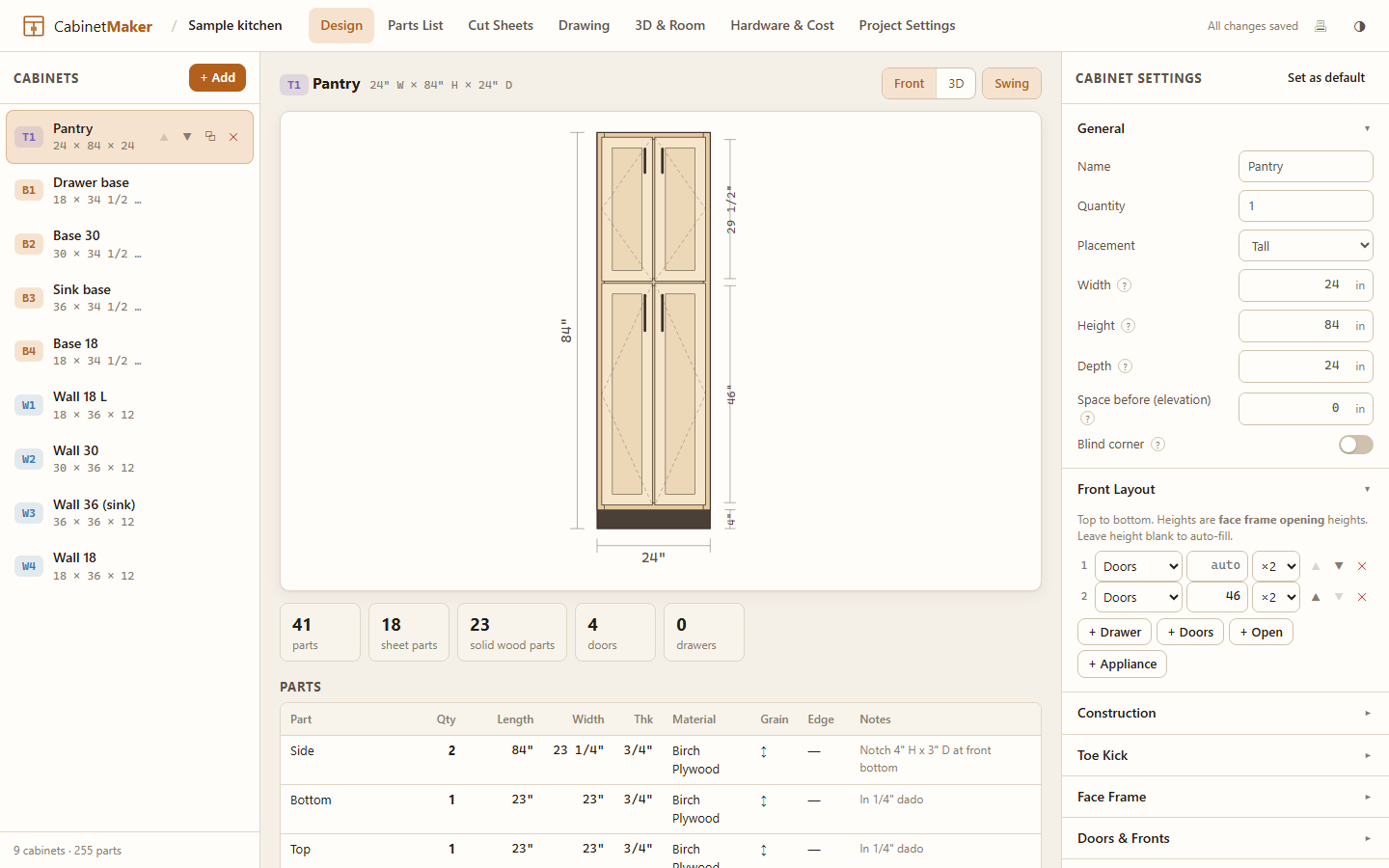
Design — the item list on the left, every construction option in the middle, and a live drawing and 3D preview on the right.
Truly portable
CabinetMaker.exe to a USB stick, a folder or the desktop, and double-click it.CabinetMaker Data folder next to it, so your work goes wherever the stick goes.Download
There is no sign-up, no trial and no email address to enter. Download it and start building.
Recommended · Windows
A single exe that runs from anywhere, including a USB stick. It needs no install and no admin rights.
40e95207597d9fdb814a384da9f6b06626cab9241d072a1ca1db6b4d4da20771
The complete app, online. Projects stay in your browser, or in your free account if you sign in.
Launch web appThe same app as plain HTML files. Unzip it and open index.html in Chrome, Edge, Firefox or Safari. It works offline.
445997813abf5f5e76b0af9601993f9dd4d42e36e1d5efae7040ef1e24db236fGet-FileHash if you want to check the file.Optional
Cabinet Maker is free, and it stays free. There is no paid tier waiting behind the download, and no feature is held back for people who contribute. If it saves you a sheet of plywood, an afternoon of math or the price of a subscription planner, a contribution helps fund the next release. It is entirely optional, and you will not be asked again.
Payments are handled by Square. Contributing unlocks nothing, creates no account, and is never required to download or use Cabinet Maker.

Questions
There isn't one. You get every feature with unlimited projects and cabinets. There are no ads, no account, no telemetry and no trial period. Donations are optional and unlock nothing.
Yes. Each project can use inches with fractions down to 1/32" or millimetres. You can type values like 34-1/2, 34.5, 2' 3" or 876mm, and every list, drawing and cut sheet follows the project's units.
Both. Face frames can be attached with pocket screws, a groove and tongue, biscuits, or glue and nails, or you can build frameless (European). Cases can be assembled with dados and grooves, butt joints with screws or pocket screws, or confirmat screws for flat-pack. Doors can be overlay or inset, shaker or slab, and drawer fronts can match the doors or be plain slabs. Toe kicks can be integrated or a separate base, or you can add baseboard molding instead.
For every material and thickness it runs several guillotine (table-saw) and free-form (CNC) packing strategies and keeps the layout with the fewest sheets and least waste. It respects saw kerf, edge trim and grain direction, and you can change the sheet size. Solid lumber gets its own board-by-board cut list.
Yes. Use the full web version on this page, or the web edition .zip. The Windows exe is a convenience wrapper that keeps everything on a USB stick and cleans up after itself; the design engine is the same.
With the exe, projects are saved as files in the CabinetMaker Data folder next to it, and you can also save copies anywhere you like. In the browser, projects are kept in that browser's local storage, so use Export or Backup all to keep files of your own.
No. The web version and the download both work fully without one. In a browser, your projects are kept in that browser, and you can export them to files whenever you like. If you sign in with your free brandonmysliwiec.com account, projects, My Items and your saved defaults are also kept in your account, so they follow you to any computer. The desktop exe always saves to its own CabinetMaker Data folder.
Yes, in three ways. Change any part of a template under Customize parts. Convert a template into a fully custom item and edit every board. Or choose My Items → Start from scratch to enter your own plans piece by piece, with size, material, position, angle and copies.
3D DXF, STL and OBJ models exported from SketchUp, Fusion 360, AutoCAD, Cabinet Vision or other CAD programs are rebuilt as a full 3D assembly. Every separate solid becomes a board at its real position and angle, with its size on the cut list. 2D DXF drawings, including Cabinet Vision / S2M part files and CNC drawings, turn each closed outline into a part; holes become cut-outs, and labels or layer names supply names and thickness. DWG files must be saved as DXF first. PDF, Excel and CSV files are not imported.
Yes. On the Cut Sheets tab, Export DXF (CNC) writes every nested sheet as a cutting layout. On the Parts List tab, it writes one closed outline per part for nesting in your own CAM software. Files are DXF R12 in your project's units, with a layer for each material and thickness and part numbers on their own layer. They work with VCarve, Aspire, Fusion 360, Cabinet Vision, SheetCam, Carbide Create and most other CAM programs.
Export any item as a .cmitem.json file, or a whole project as a project file. Anyone can import it into the app or the web version. Projects also download as a complete PDF (drawings with dimensions, cut list, materials and cut sheets), parts lists export to CSV, and drawings to SVG.
Please get in touch through the contact page. New templates and features are added based on what people ask for.